Skip to services
TS SAFETY GROUPWebsite review · Digital workflows use example data

CONSTRUCTION SAFETY STAFFING & SUPPORT

People on site.
Clarity around
the work.

On-site safety professionals, practical programs and a connected field experience. Choose the support that fits your project.

THE TS FIELD EXPERIENCE
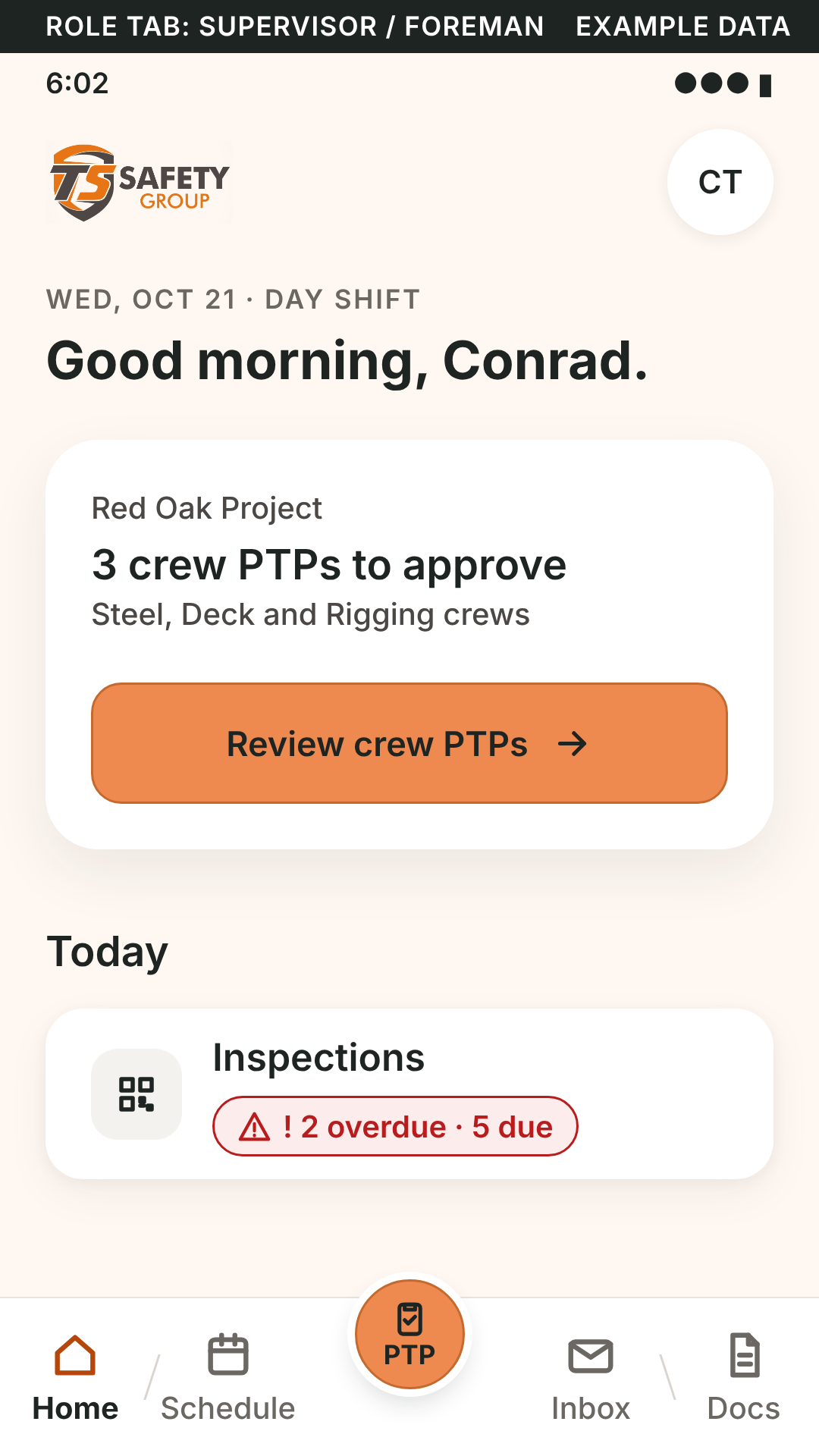
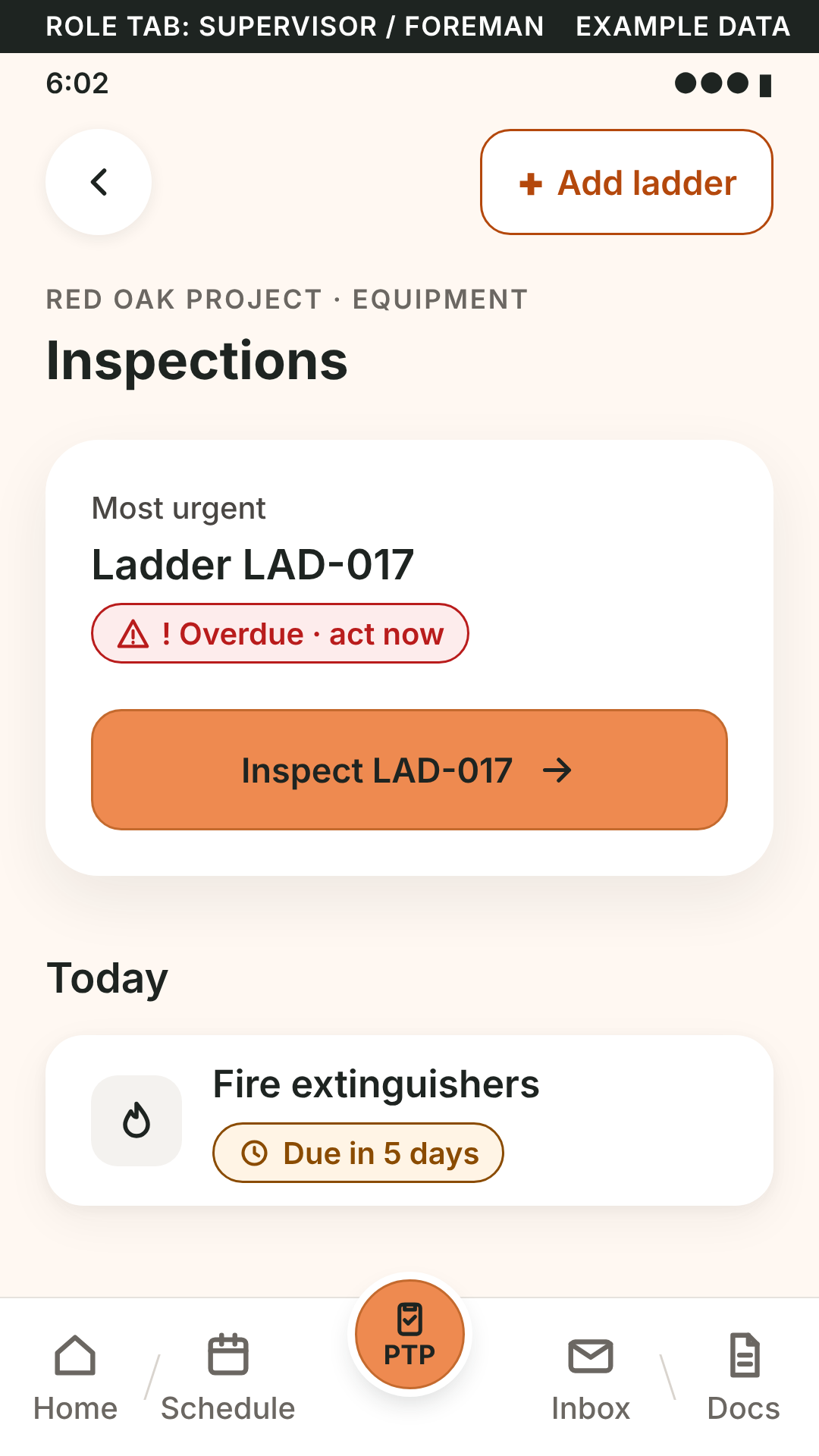
TS app design preview of ladder and fire-extinguisher inspection tasks with example dataTS app home design preview for Conrad showing example crew PTP reviews and inspections
TS app design previews · EXAMPLE DATA
Open the current employee preview

THE FULL SERVICE MAP

Find your next layer of support.

What the status labels mean
Service scope
Human-delivered TS support; project scope, qualifications and coverage are confirmed with TS.
Interactive preview
A review workflow exists. It may use example data and device-local records; live accounts and shared services are separate.
PLANNED
An agreed direction or design remains to be approved, mapped or connected.
Proposed
A proposed capability or paid option. Scope and commercial terms need confirmation.
IN DEVELOPMENT
The real connection or production service is being developed and is not connected in this review.
EHS REVIEW DRAFT
Draft refresher media exists for review. It is not an approved course, certification or equipment authorization.

34 services and workflow concepts across six areas.

Service scope and digital previews are labeled separately.

SAFETY + QUALITY CONTROL · PILOT IN DEVELOPMENT

Your programs. One coordinated field team.

Safety services are available today. The combined pilot supports safety and quality documentation within each client’s existing safety and QC programs. Scope, qualification requirements, oversight, pricing and rollout are agreed with the client.

PILOT IN DEVELOPMENT

Hybrid safety + QC pilot

Safety services are available today. We’re building a combined safety + QC pilot within the client’s existing programs.

See the scope

Pilot scope and qualification requirements are agreed with the client. Steel → Bolt-up organizes approved client drawings, procedures and bolt inspection documentation for review. No standalone QC service or production rollout is offered here.

Open the review workflow ↗
Interactive preview · HYBRID PILOT

QC performance, in context

A reporting view for the combined safety + QC pilot, shaped around the client’s own program.

See the scope
  • Project, date, crew and result filters across the same example dataset
  • Pass/fail trends, follow-up heatmap and matching-record drilldowns
  • Item-specific QA drafts, Steel / Bolt-up modes and reviewed source-reference metadata

The walkthrough uses fictional records and browser-local drafts. It is part of the hybrid pilot being built. Shared reporting, corporate account permissions and live project data are not connected.

Explore the QC report ↗

No standalone QC service or production rollout is offered here. The working example uses fictional records and browser-local drafts; shared reporting, corporate permissions and live project data are not connected.

01 / PEOPLE & THE PROJECT

The right people. Where the work happens.

Start with on-site safety professionals and practical project support. TS confirms the service scope, qualifications and coverage for your job.

Service scope

Field safety staffing

Safety coordinators, leads and project coverage shaped around your work, crew and schedule.

See the scope
  • On-site safety manager, coordinator and lead roles
  • Shift coverage, added site support and contractor coordination
  • Qualifications, staffing levels and coverage agreed for the project

Human-delivered service; availability and scope are confirmed by TS.

Discuss your project
Service scope

Daily planning & project support

Help crews start with a shared plan and respond to changing field conditions.

See the scope
  • Crew briefings and task-planning support
  • Job hazard analysis and coordination of task controls
  • Field observations, open items and practical follow-up
Discuss your project
Service scope

Safety programs & documents

Plans and resources tailored to the contractor, trade and site.

See the scope
  • Site-specific safety plans (SSSP) and EHS manuals
  • Procedures, project resources and document review
  • Organized project records and controlled updates

Approval, authorship and revision requirements remain with the agreed project process.

Discuss your project
Service scope

Equipment & site inspections

Inspection support for the equipment and conditions crews work with.

See the scope
  • Fall protection, rigging, ladders, lifts and access equipment
  • Fire extinguishers, vehicles, temporary power and site conditions
  • Findings, tag-out documentation and corrective-action evidence

Use approved project and manufacturer criteria; digital templates are mapped and reviewed separately.

Discuss your project
Service scope

Credential & renewal coordination

Organize the evidence and next steps that keep credential reviews moving.

See the scope
  • Certification documents, exhibits and recorded dates
  • Renewal planning and issuer-specific next steps
  • Refresher and course coordination

A training video or uploaded photo does not automatically renew a credential.

Discuss your project
Service scope

Incident & corrective-action support

A clear path from the first report to the next action.

See the scope
  • Hazard reports, good catches and incident documentation
  • Escalation, action owners and supporting evidence
  • Follow-up and documented closure review
Discuss your project
Service scope

JHA, AHA & JSA support

Task analyses shaped around the work and reviewed with the project team.

See the scope
  • Job Hazard, Activity Hazard and Job Safety Analysis support
  • Task, trade, contractor and crew-language context
  • Manager review before an approved analysis enters the field workflow

Automated analysis generation and automatic transfer into PTPs are proposed workflows.

Discuss your project
Service scope

Hazard-control follow-through

Connect an observed hazard with its control, responsible person and verification.

See the scope
  • Task, hazard and risk context
  • Control selection using the project’s approved process
  • Follow-up evidence and review of the remaining concern

No guaranteed incident reduction, TRIR reduction or DART reduction is claimed.

Discuss your project

02 / CLEAR DOCUMENTATION

Your forms. Clear in every language.

Keep approved originals sharp, then map the digital workflow around the way your crews work. English stays alongside Español or 中文.

Interactive preview

A clear forms library

Find TS universal templates and your company’s supplied originals in one organized place.

See the scope
  • Search and category views for inspection, project and training documents
  • Sharp PDF originals alongside mapped digital working forms
  • Forms filed under the selected contractor and project

Current working digital mappings vary by supplied template. Uploading a document does not automatically map every field.

Explore documents
Interactive preview

Paper inspection / Digital

Two clear choices, built around the supplied original.

See the scope
  • Clean, zoomable paper previews and access to the original PDF
  • Editable metadata, inspection results and notes on mapped forms
  • Print or export an unsigned working record for review

The universal TS harness is mapped. Other original forms need their own field mapping and QA.

Explore the harness form
Interactive preview

Speak. Review. Fill.

Dictate a field, review the transcript, then apply the value yourself.

See the scope
  • Talk-to-fill and keyboard entry for mapped fields
  • Read-aloud guidance in the selected supported device language
  • Stop speaking & listening; Clear form with Undo

Browser speech support, microphone permission and installed voices vary. Speech never infers a signature, approval or uncertain result.

Try the voice-fill preview
Interactive preview

English · Español · 中文

A multicultural workday with English visible beside the selected language.

See the scope
  • Language choice at sign-in and while working
  • A remembered employee/company preference
  • Translated interface, form labels and language-matched guidance

Native-speaker review and approved translations of each original company form are still required.

Explore language choices
Interactive preview

Inspection records, organized

Find a saved record by year, month, contractor and project.

See the scope
  • Date filters and project context
  • Inspector, equipment identity, result and notes on mapped records
  • Original documents and local supporting evidence

The native review currently demonstrates locally saved harness records. Shared reporting and the remaining form mappings are in development.

Explore inspection records

03 / FIELD FOLLOW-THROUGH

See the plan. Capture the work. Follow up.

A personal workday brings assigned projects, open items, crew plans, inspections and walk records into one place.

Interactive preview

Weekly worked hours

A distinct manual hours record for project review and billing preparation.

See the scope

PTP/photo acknowledgments never create paid hours. Shared client reporting, approval and payroll connections are in development.

Open the review workflow ↗
Interactive preview

Digital Daily Report

Six sections for the day’s work, weather, orientations, incidents and coaching.

See the scope

Typing and tapping by default, with optional microphone. Save and print locally; email/text open reviewed drafts only.

Open the review workflow ↗
Interactive preview

Personal sign-in & sign-out

An employee’s own account, photo and project context are part of the planned daily record.

See the scope
  • Personal employee entry with an assigned-project view
  • Photo-backed check-in and check-out preview
  • Time and PTP acknowledgements prepared for weekly review

Secure live accounts and payroll connections are in development. A photo alone does not verify identity.

Explore time & check-in
Interactive preview

QR site walks & location evidence

Checkpoint records make site observations and follow-up easier to review.

See the scope
  • Assigned QR checkpoints and a project walk log
  • Walker, checkpoint, timestamp and device-reported location
  • Notes, evidence and follow-up for the client record

Hourly timing follows the approved site plan. GPS alone is not proof of presence; a missing upload is an evidence gap, not proof that a walk did not happen.

Explore QR job walks
PLANNED

Equipment QR checks & tag-out

Open the right approved inspection from an equipment identifier.

See the scope
  • Equipment-specific QR entry to mapped checklists
  • Defect notes, photos and tag-out documentation
  • Responsible-person follow-up and release review

The complete equipment QR/tag-out and shared GC workflow is planned. No automatic equipment release or universal tag-out rule is claimed.

Discuss your project
Interactive preview

Open items, up front

A short introduction, assigned project and the actions that need attention today.

See the scope
  • Crew PTP reviews and inspection counts near the top
  • Job-walk records, certification alerts and follow-up tasks
  • Separate employee, supervisor and director view concepts

Current native records and example alerts are device-local. Real project assignments and role-enforced access are in development.

Explore the employee workday
PLANNED

Daily PTP & personal acknowledgement

Keep the task plan, crew acknowledgement and check-in evidence together.

See the scope
  • The crew’s task, hazards, controls and approved attachments
  • Individual employee acknowledgement and personal photo
  • A daily record prepared for time review

PTP remains PLANNED. Secure signatures, live notifications and payroll processing are not connected.

Review the PTP preview
PLANNED

Crew PTP review

Give the safety professional the plan, attachments and specific follow-up in one view.

See the scope
  • Crew completion alerts and a review queue
  • Approve or return through the agreed project process
  • Notes and supporting attachments kept with the plan

Example crew events demonstrate the flow. Real cross-device alerts and approval authority are in development.

Explore crew review
Interactive preview

Weekly audits & Monday tasks

Tailor the questions, record observations and see weeks that still need a submission.

See the scope
  • Editable example sections, questions and required answers
  • One local Monday-start task per employee and project
  • Saved drafts, reviewed local submissions and overdue-week flags

Tasks catch up when this preview opens. Unattended Monday scheduling, shared supervisor flags and employee notifications are in development. Templates need company approval.

Explore weekly audits

04 / READY FOR WHAT’S NEXT

Keep renewals and refreshers in view.

Bring credential records, upcoming dates and the right refresher together. Issuer verification and company review remain part of the process.

Interactive preview

Credential profiles & sharing

Keep completed and in-progress credentials connected to their exhibits.

See the scope
  • Employee profile and certification evidence
  • QR, email and print-sharing design references
  • Project reviewers see the credential context they need

Example records are not verified credentials. Production expiring share links and permissions need connection and review.

Explore credential profiles
Interactive preview

Renewal dates, alerts & preferences

See what is approaching and plan the next step before the recorded expiry.

See the scope
  • Recorded issue/expiry dates, calendar and renewal queue
  • Suggested 60/30/14/7-day reminder preview, subject to approved rules
  • Employee-controlled optional text-message preference, off by default

Notification and SMS delivery are IN DEVELOPMENT. Device preferences do not register server consent; supervisors cannot opt in their crew.

Explore renewal planning
PLANNED

Refresher training planning

Connect the next refresher topic with the task, crew and upcoming renewal.

See the scope
  • A dedicated library of 26 refresher topics
  • Search and six topic categories
  • Approved language versions and renewal links as content is supplied

Approved training and issuer-specific renewal requirements remain separate. Viewing does not certify, renew or authorize work.

Explore the refresher library
EHS REVIEW DRAFT

Refresher training videos

Five English videos are ready for EHS review, with captions and source notes.

See the scope
  • PTP sign-off; ladder checks; harness/fall-arrest checks
  • Hazard reporting and the hierarchy of controls; QR walks
  • English narration and captions; Español and 中文 versions planned

EHS REVIEW DRAFT. These are refresher drafts, not approved courses or certifications. Company procedure and equipment-specific review remain necessary.

Review training drafts

05 / CONTEXT FOR DECISIONS

Useful answers. A clearer project picture.

Explore the planned assistant, project indicators and weekly time review. People review the source evidence and make the decision.

Proposed

Photo-backed weekly time review

Bring sign-in/out evidence and the employee’s weekly review into a clear office workflow.

See the scope
  • Personal timestamps, photos and acknowledgement context
  • Employee review followed by the office’s approval process
  • Project and week context retained with the record

Photos alone do not verify identity. Payroll, wage calculations and shared approval delivery are not connected.

Explore the time preview
Proposed

Project safety metrics

A project view of leading and lagging indicators, with evidence behind the numbers.

See the scope
  • Inspection, PTP, observation, near-miss and action indicators
  • Proposed TRIR, DART and LTIR views when reliable hours exist
  • Project, date and crew filters with clearly labeled example data

Example numbers do not represent actual performance. Rates must remain unavailable until the required records and hours are validated. No guaranteed reduction is claimed.

Explore the staff preview
Proposed

Field Safety Assistant

Start with company policy, then the applicable OSHA text and supporting sources.

See the scope
  • Company policy section, page and paragraph first
  • Applicable OSHA 1926 or 1910 next; authorized standards and interpretations where relevant
  • A complete answer design with missing-source gaps kept visible

The current preview searches saved excerpts and presents a verified reference example. AI generation, full-document indexing and automatic citation verification are in development. ANSI content needs suitable use rights.

Explore the source-aware preview

06 / FIELD TO OFFICE

The right view for each team.

Employee, client and director experiences are being shaped around the company and project. Shared access and external connections remain in development.

Interactive preview

Client, employee & director views

Give each role a clear front door and a focused view of the work.

See the scope
  • Employee: assigned project, open items and personal records
  • Client/supervisor: project crews, credential reviews and follow-up
  • Director/office: all-project overview and operational reporting

These are role-view designs and review access. Server-enforced company/project permissions and authenticated production sign-ins are in development.

Explore the employee view
IN DEVELOPMENT

Procore & HammerTech connections

A planned path for approved records to travel into the client’s existing project systems.

See the scope
  • Proposed PTP, sign-in, inspection and project-document exchange
  • Credential-status and project-hour connections where approved
  • Connection scope and permission review with each client

IN DEVELOPMENT. Neither system is connected in this review; no integration partnership or delivery date is claimed.

Discuss your project
PLANNED

A tailored company workspace

The company’s branding, approved forms and project structure in a dedicated experience.

See the scope
  • A branded entry and supplied company templates
  • Company/project organization and assigned-role design
  • Shared document storage and data-access controls to be connected

Production storage capacity, commercial terms, backup, security and access controls require confirmation. No provisioned 3 TB allocation or free-service commitment is promised.

Discuss your project

A FOCUSED VIEW FOR EVERY ROLE

The right information.
For the person who needs it.

Explore how the portal is being organized. Production account permissions and shared company records are in development.

01 / EMPLOYEE

Start with your day.

Your assigned project, open items, inspections, personal records and refresher topics.

Employee preview ↗
02 / CLIENT & SUPERVISOR

See the project clearly.

Crew plans, inspection findings, walk evidence and credential follow-up in the project context.

Company-view preview ↗
03 / DIRECTOR & OFFICE

Connect the bigger picture.

Project overview, staffing and operational reporting with clearly labeled example records.

Staff CRM preview ↗

REFRESHER TRAINING

A useful next step.
Ready for review.

Five short English refresher videos now have narration, captions and source notes. They are EHS review drafts; approved content and Español / 中文 versions follow review.

Review the training library
EHS REVIEW DRAFT
  • PTP review & personal sign-off
  • Ladder checks before use
  • Harness & fall-arrest checks
  • Hazard controls & reporting
  • QR walks & follow-up

Refresher viewing does not renew a credential, certify a worker or authorize equipment use.

START WITH YOUR PROJECT

Tell us about the crew.
We’ll plan the support.

Your site, schedule and contractor requirements shape the conversation.